Lab 1 — Tone → RF → IQ → Analysis
This showcase is the first complete engineering loop of the course. A simple tone is intentionally used because it makes every mistake visible: wrong sample rate, gain overload, frequency offset, clipping, image components and incorrect IQ interpretation.
Goal
Build a minimal but real SDR experiment:
reference tone → FPGA/RF transmitter → independent receiver → IQ file → offline analysis → engineering conclusion
Measurement scenario
flowchart LR
    REF["Reference model<br/>MATLAB / Simulink"]
    PARAM["Experiment setup<br/>Fs / Fc / gain / tone"]
    TX["Zynq + AD9363<br/>tone generation / TX path"]
    LINK["RF link<br/>coax + attenuator or antenna"]
    RTL["RTL-SDR<br/>independent receiver"]
    HDSDR["HDSDR<br/>spectrum / waterfall / recording"]
    IQ["IQ file<br/>WAV / RAW / CI16"]
    ANA["Offline analysis<br/>FFT / SNR / spur check"]
    REPORT["Lab report<br/>plots / settings / conclusion"]

    REF --> PARAM --> TX --> LINK --> RTL --> HDSDR --> IQ --> ANA --> REPORT
    ANA -. retune gain .-> PARAM
    ANA -. correct model .-> REF
Hardware setup
| Block | Role | Notes |
|---|---|---|
| Zynq-7020 + AD9363 | RF source | Generates or plays the tone through the SDR TX path |
| Coax / attenuator / antenna | RF channel | Coax + attenuation is preferred for repeatable early experiments |
| RTL-SDR | Independent receiver | Confirms that the signal is really present outside the board |
| HDSDR | Visual inspection and recording | Spectrum, waterfall, gain adjustment, IQ recording |
| MATLAB / Python / GNU Radio | Offline verification | Reproducible FFT and quantitative checks |
Do not start with maximum gain
The first lab should teach measurement discipline. Start with conservative TX and RX gain, then increase only after checking overload and clipping.
Signal definition
Recommended initial parameters:
| Parameter | Example | Why |
|---|---|---|
| Tone offset | 50 kHz | Clearly visible away from DC |
| Receiver sample rate | 2.4 MS/s | Common stable RTL-SDR setting |
| Capture duration | 2–10 s | Enough for FFT averaging and repeatability |
| RF path | coax + attenuator | Safer and more repeatable than over-the-air |
| File format | WAV or raw IQ | Easy to replay and analyze |
The exact values are less important than documenting them. Every plot must be traceable to the settings that produced it.
Expected observations
flowchart TB
    GOOD["Clean result"]
    PEAK["Single dominant FFT peak"]
    FLOOR["Stable noise floor"]
    NOCLIP["No clipping / overload"]
    OFFSET["Frequency offset documented"]

    BAD["Bad result"]
    CLIP["Flat-topped time waveform"]
    SPUR["Unexpected spurs"]
    DC["Large DC component"]
    DRIFT["Frequency drift / unstable LO"]

    GOOD --> PEAK --> FLOOR --> NOCLIP --> OFFSET
    BAD --> CLIP
    BAD --> SPUR
    BAD --> DC
    BAD --> DRIFT
Analysis checklist
| Check | Pass condition | Engineering action if failed |
|---|---|---|
| Tone frequency | Peak appears at expected offset | Verify sample rate, LO, mixer sign and FFT axis |
| Noise floor | Stable and below the tone | Adjust gain and bandwidth |
| Clipping | No saturated IQ samples | Reduce TX/RX gain or add attenuation |
| Spurs | No unexpected strong images | Check DDS, mixer, filters and RF gain settings |
| Repeatability | Similar result after rerun | Save configuration and capture metadata |
Demo figure
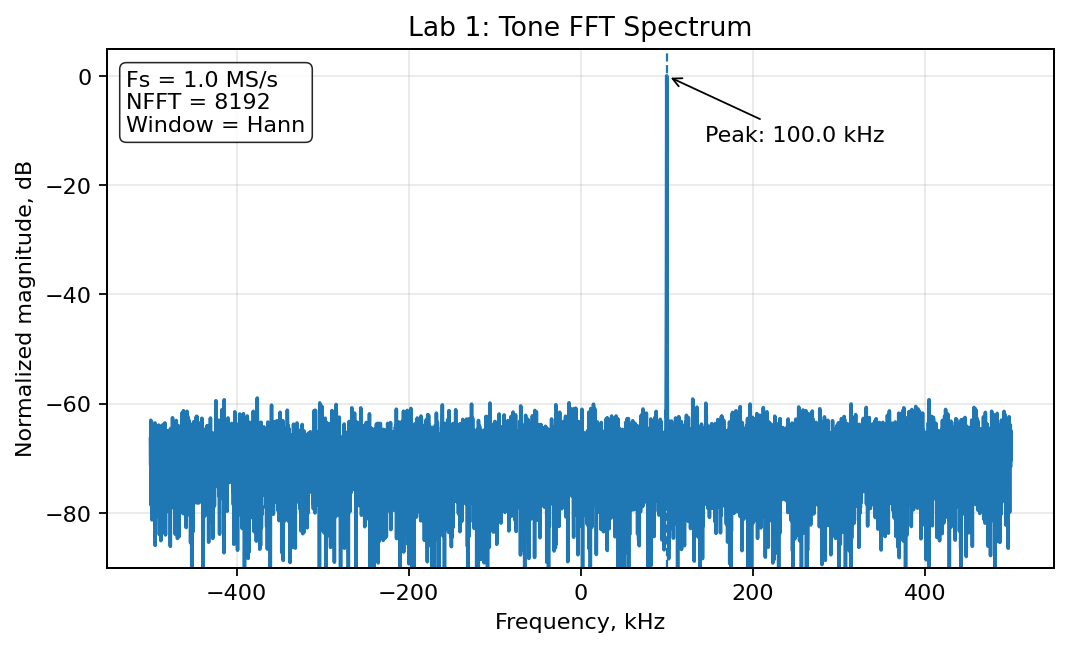
This generated FFT is the documentation target style: readable labels, visible peak, clean grid and enough context for a lab report.
Minimum lab report
A completed Lab 1 report should include:
- Hardware photo or connection diagram.
- TX configuration: carrier, sample rate, tone offset, gain.
- RX configuration: center frequency, sample rate, gain, bandwidth.
- IQ recording format and duration.
- FFT plot with frequency axis and units.
- Engineering conclusion: correct / overloaded / wrong frequency / needs retuning.
Why this lab matters
A tone looks simple, but it validates the entire experimental discipline:
configuration → physical signal → independent capture → reproducible analysis
After this loop works, the same method scales to AM/FM, BPSK/QPSK, synchronization, EVM and BER experiments.